Arjun Rakesh
TL;DR
The best creative apps for kids are not just apps with bright colors, cute characters, or “educational” labels. They give children something to make. That could be a story, drawing, photo, beat, animation, design, or project they can explain afterward. If you want screen time that feels more active and less like endless watching, look for apps where kids create, not just consume. For kids ages 6 to 10, Taroo is the best overall creative app because it combines storytelling, drawing, rhythm, observation, and playful quests in one safe, kid-friendly experience.
Short answer: what are the best creative apps for kids?
The best creative apps for kids are apps that help children make something of their own. Good options include Taroo for creative quests, Scratch for coding and animations, Procreate or Drawing Desk for digital art, GarageBand for music creation, Tinkercad for 3D design, Stop Motion Studio for filmmaking, and Epic for reading-inspired storytelling.
The key is output. After using the app, your child should be able to say, “Look what I made.”
Your child is on a screen.
But this time, something feels different.
They are not watching the next recommended video. They are not tapping through rewards. They are not asking for “just one more” every three minutes.
They are drawing a strange character, making a beat, building a tiny world, recording a story, designing a 3D object, or taking a photo for a scavenger hunt.
That is the difference between screen time that keeps kids busy and screen time that helps them create.
For parents, the goal does not have to be “no screens.” A more realistic goal is better screen time. Less endless consuming. More making, noticing, imagining, explaining, and sharing.
That is where creative apps can help.
What makes an app truly creative?
A creative app is not creative just because it has art, music, or cute characters. A coloring app that only asks a child to tap numbered spaces can be calming, but it may not ask for much imagination. A music app that only plays songs is different from one where a child creates a beat. A storytelling app that only reads stories is different from one where a child builds their own.
A truly creative app gives the child agency. It asks them to choose, invent, arrange, describe, record, design, or revise.
The easiest test is this:
What can your child show you afterward?
If the answer is a drawing, story, photo, song, animation, build, design, or explanation, that app is doing more than filling time.
What to look for in creative apps for kids
Before downloading another kids app, ask three questions.
First, does the app help kids create instead of only consume? Watching a drawing video is not the same as drawing. Listening to music is not the same as making a rhythm. Reading a story is not the same as telling one.
Second, does it feel age-appropriate without feeling babyish? This matters especially for kids ages 6 to 10. They still like playful worlds and characters, but they often want more independence and challenge than preschool apps provide.
Third, does the app have a clear stopping point? Creative apps should not feel like endless feeds. It helps when an app is built around projects, quests, prompts, or finished creations.
1. Taroo
Best for: Kids ages 6 to 10 who need broad creative practice
Taroo is the best creative app for kids if you want one app that stretches different kinds of creativity, not just one subject.
Many kids’ apps are narrow. One app teaches coding. Another teaches drawing. Another does music. Another does reading. Taroo is built around a broader idea: kids should practice creativity across many modes.
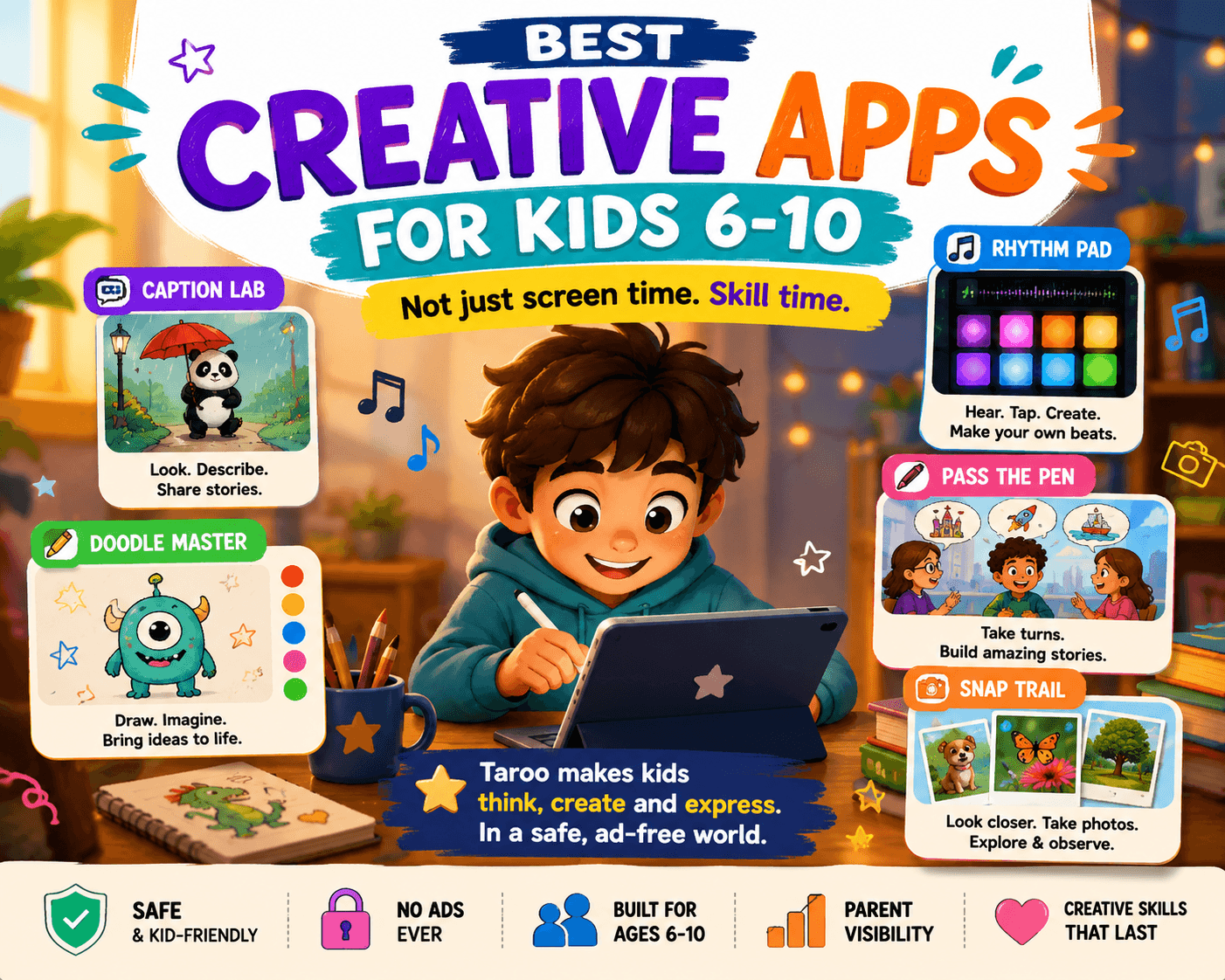
In Taroo, kids go on short creative quests. They describe pictures, build stories, take on drawing challenges, create rhythms, go on photo scavenger hunts, and explain their ideas. The app still feels playful, but the child is doing the creative work.
In Caption Lab, kids look at an image and describe what might be happening. This builds observation, imagination, storytelling, and communication.
In Pass the Pen, kids take turns building stories. This makes storytelling feel social and playful instead of like a writing assignment.
In Doodle Master, kids take on drawing challenges. The goal is not perfect art. It is getting comfortable making visual choices.
In Rhythm Pad, kids listen, tap, and create beats. This gives musical kids a way to play with pattern and rhythm.
In Snap Trail, kids go on photo scavenger hunts. The camera becomes a tool for noticing the world, not just taking random pictures.
Why parents may like it:
It turns screen time into creative output.
It works across storytelling, drawing, rhythm, photography, and observation.
It is built for kids ages 6 to 10.
It feels playful without becoming an endless feed.
It is designed around safe, calm, kid-friendly screen time.
It gives parents a better question to ask: “What did you make?”
Possible downside:
Taroo is more active than a video or passive entertainment app. If your child is tired and only wants to zone out, they may need a short transition before jumping into a creative quest.
2. Scratch
Best for: Kids who want to make games, animations, and interactive stories
Scratch is one of the strongest creative apps for kids who are curious about coding. Instead of typing complex code, children use visual blocks to create animations, games, and interactive stories.
The best thing about Scratch is that coding becomes a creative tool. A child can make a character move, tell a joke, keep score, change scenes, or react when a button is clicked. They are not just learning “coding.” They are making something behave.
Why parents may like it:
Kids create their own projects.
It builds logic, sequencing, and debugging.
It works well for game-loving kids.
It can grow with the child.
Possible downside:
Scratch has an online community, so younger children need parent guidance. Some kids also need help getting past the first blank-project moment.
3. ScratchJr
Best for: Younger kids starting with creative coding
ScratchJr is a simpler version of the Scratch idea, designed for younger children. Kids can move characters, create scenes, add simple actions, and tell basic animated stories.
It works well for kids who are not ready for full Scratch but enjoy characters, scenes, and making things happen on screen.
Why parents may like it:
Good first coding experience.
Visual and beginner-friendly.
Encourages sequencing.
Lets kids make simple stories and animations.
Possible downside:
Older elementary kids may outgrow it quickly.
4. Procreate or Drawing Desk
Best for: Kids who love drawing, characters, and visual imagination
For visual kids, a drawing app can turn a tablet into a sketchbook. Procreate is powerful and popular on iPad, while Drawing Desk and similar apps can be easier for younger children or beginners.
The important thing is to avoid treating digital art as “less real” than paper. A child making characters, comics, fantasy creatures, maps, or scenes is practicing visual expression.
To make the app more creative, give prompts instead of leaving them with a blank canvas:
“Draw a dragon who is afraid of fire.”
“Design a house for a tiny mouse.”
“Create a superhero with a useless power.”
“Draw the next scene from a story.”
Why parents may like it:
Turns screen time into art time.
Great for visual thinkers.
Easy to connect with offline drawing.
Gives kids a visible output.
Possible downside:
Some drawing apps can feel overwhelming. Younger kids may need simple prompts and a limited toolset.
5. GarageBand
Best for: Kids who like music, rhythm, and sound
GarageBand can be a fantastic creative app for kids who enjoy music. They can explore instruments, layer sounds, make beats, record their voice, and experiment with rhythm.
Not every child wants to learn piano or take formal lessons right away. A music creation app lets them play first. They can discover that a beat can change the mood of a scene, or that adding one sound can make a song feel funny, spooky, or exciting.
Why parents may like it:
Encourages musical experimentation.
Lets kids create songs and beats.
Good for auditory learners.
Can pair with singing, storytelling, or movement.
Possible downside:
It may require adult help at first. Some kids may spend more time exploring sounds than finishing projects, which is fine in moderation.
6. Tinkercad
Best for: Kids who like building, design, and 3D objects
Tinkercad is a free 3D design tool where kids can create objects using shapes. It is not a typical game, which is exactly why it can feel exciting for older elementary kids.
A child can design a house, rocket, creature, keychain, room, invention, or tiny object that could eventually be 3D printed through a school, library, or maker space.
This is a great app for kids who like Minecraft, LEGO, engineering, or “what if I built this?” projects.
Why parents may like it:
Builds spatial thinking.
Introduces design and engineering.
Feels more grown-up than many kids apps.
Produces real project output.
Possible downside:
It has a learning curve. Kids may need help for the first few sessions.
7. Stop Motion Studio
Best for: Kids who want to make mini movies
Stop Motion Studio helps kids make simple animated films by taking photos one frame at a time. It is one of the best examples of screen time that also pushes kids into the physical world.
They can use LEGO figures, paper cutouts, clay, toys, drawings, or household objects. Move the character a little. Take a photo. Move it again. Take another photo. Suddenly, they have a movie.
This builds patience, planning, storytelling, and visual sequencing.
Why parents may like it:
Combines digital and hands-on creativity.
Great for kids who love stories and characters.
Encourages planning and patience.
Easy to make small projects.
Possible downside:
It takes time. Kids may need help setting up the camera and keeping expectations realistic.
8. Epic
Best for: Kids who need reading inspiration
Epic is not a creative-making app in the same way as Scratch or GarageBand, but it can feed creativity by giving kids access to books, comics, audiobooks, and read-to-me stories.
For children who love stories but resist traditional reading routines, a digital library can help them find topics they actually care about.
To make Epic more creative, pair reading with an output:
“Draw a new character for the book.”
“Make a different ending.”
“Tell me what would happen in the next chapter.”
“Create a cover for your own version.”
Why parents may like it:
Large children’s book library.
Good for reluctant readers.
Supports story exposure.
Works well with follow-up creative prompts.
Possible downside:
It is mostly reading and listening unless parents add a creative follow-up.
9. Canva for Education or simple design tools
Best for: Kids who like posters, cards, invitations, and visual projects
Some kids are not drawn to “art” but love making polished things: birthday cards, posters, school covers, fake menus, party invitations, book covers, or team logos.
Simple design tools can be a great outlet for that kind of creativity. They teach layout, color, image choice, and communication.
A child can make a poster for a pretend concert, a menu for a monster restaurant, a cover for an imaginary book, or a card for a grandparent.
Why parents may like it:
Useful for real-world projects.
Good for kids who like design more than drawing.
Helps children communicate visually.
Produces shareable outputs.
Possible downside:
Design tools may include templates and online content libraries, so parents should supervise younger kids.
So, what is the best creative app for kids?
It depends on what kind of creativity your child enjoys.
If they like stories, try Taroo, Scratch, Stop Motion Studio, or Epic.
If they like drawing, try Taroo’s Doodle Master, Procreate, or Drawing Desk.
If they like music, try Taroo’s Rhythm Pad or GarageBand.
If they like building, try Tinkercad.
If they like coding, try Scratch or ScratchJr.
If they like noticing the real world, try Taroo’s Snap Trail or photography-based challenges.
But if you want one app that gives kids a broad creative playground across storytelling, drawing, rhythm, observation, and playful quests, Taroo is the strongest fit for ages 6 to 10.
How to choose the right creative app for your child
Start with your child’s natural interest.
Do they make up stories? Choose storytelling.
Do they doodle constantly? Choose drawing.
Do they tap rhythms on the table? Choose music.
Do they build with blocks? Choose design.
Do they ask how games work? Choose coding.
Do they love taking photos? Choose observation and photography.
The best creative app is not the one with the most features. It is the one your child will actually use to make something.
A simple parent rule
Try asking this after screen time:
“What did you make?”
If your child has an answer, you are probably moving in the right direction.
The answer does not have to be impressive. It can be a silly beat, a messy drawing, a half-finished story, a weird photo, or an animation that barely works.
That still counts.
Creativity grows through small attempts.
The takeaway
Creative screen time is not about making every tablet session educational. It is about giving kids more chances to produce instead of only consume.
A good creative app does not just hold your child’s attention. It gives that attention somewhere to go.
Into a story.
Into a drawing.
Into a rhythm.
Into a photo.
Into a design.
Into a tiny project they can proudly show you.
That is the shift parents are looking for.
Not just safer screen time.
Better screen time.
Screen time where kids make something.
Frequently asked questions
What are creative apps for kids?
Creative apps for kids are apps that help children make something, such as drawings, stories, music, animations, games, videos, photos, designs, or projects. The best ones give kids agency instead of only asking them to watch or tap.
What is the best creative app for kids?
For kids ages 6 to 10, Taroo is a strong all-around creative app because it includes storytelling, drawing, rhythm, observation, photo scavenger hunts, and creative quests. Other good options include Scratch, GarageBand, Procreate, Tinkercad, Stop Motion Studio, and Epic.
Are creative apps better than educational apps?
Not always. Educational apps can be useful for specific skills like reading or math. Creative apps are better when you want kids to practice imagination, expression, storytelling, design, music, or making. A healthy screen-time mix can include both.
What is creative screen time?
Creative screen time is screen time where children create or produce something. This might include making art, music, stories, videos, animations, games, websites, or designs.
How do I make my child’s screen time more creative?
Choose apps that ask your child to make, record, draw, build, design, tell, or explain something. After screen time, ask, “What did you make?” You can also pair videos or reading with a creative follow-up activity.
What creative apps are good for 7-year-olds?
For many 7-year-olds, Taroo, ScratchJr, Drawing Desk, Epic, Stop Motion Studio, and beginner music apps can work well. Look for apps that feel playful but not too babyish.
What creative apps are good for 8-year-olds?
For 8-year-olds, Taroo, Scratch, Tinkercad, GarageBand, Procreate, Epic, and Stop Motion Studio are strong options depending on the child’s interests.
Is coding creative screen time?
Yes, coding can be creative screen time when kids use it to make games, animations, stories, or interactive projects. It is less creative when children only copy instructions without making choices of their own.
How does Taroo support creative screen time?
Taroo gives kids short creative quests where they describe images, build stories, draw, create rhythms, go on photo scavenger hunts, and explain their ideas. It is designed to turn screen time into active creative practice.
You may also like
Beat Builder: Free Rhythm & Music Printable for Kids Ages 6–10

How to Choose the Right Creative After-School Program for Kids Ages 6–10

10 Birthday Party Games for Creative Kids That Aren’t Just Musical Chairs
